Motion Ability
Settings related to the motion capabilities of the printer.
- Emit limits to G-code
- Resonance Compensation
- Speed limitation
- Acceleration limitation
- Jerk limitation
Emit limits to G-code
Mode: Advanced.
Variable: emit_machine_limits_to_gcode.
If enabled, the machine limits will be emitted to G-code file.
This option will be ignored if the G-code flavor is set to Klipper.
Resonance Compensation
Resonance Compensations are the methods used to reduce the vibrations of the printer during high-speed movements, which can cause ringing on the surface of the model.
Resonance Avoidance
Mode: Advanced.
Variables: resonance_avoidance, min_resonance_avoidance_speed, max_resonance_avoidance_speed.
By reducing the speed of the outer wall to avoid the resonance zone of the printer, ringing on the surface of the model are avoided.
Tip
Check the VFA Calibration.
Input Shaping
Mode: Expert.
Variables: input_shaping_emit, input_shaping_freq_x, input_shaping_freq_y, input_shaping_damp_x, input_shaping_damp_y.
During high-speed movements, vibrations can cause a phenomenon called "ringing," where periodic ripples appear on the print surface. Input Shaping provides an effective solution by counteracting these vibrations, improving print quality and reducing wear on components without needing to significantly lower print speeds.
Note
Some Printers have built-in accelerometers that can be used to automatically measure the resonant frequencies of the printer.
If your printer has one, consider using it as it can provide more accurate results in less time and usually is autosaved into the printer firmware.
Tip
It's usually recommended to perform Input Shaping calibration once a year or after any mechanical or structural changes such as relocation, changing the support surface, new belts, motors, frame, etc.
Important
RepRap can only set one frequency for both X and Y axes so you will need to select a frequency that works well for both axes.
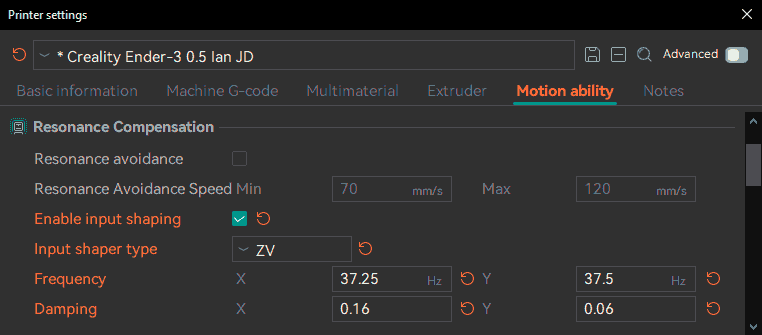
Input Shaping Type
Mode: Expert.
Variable: input_shaping_type.
The Input Shaping type determines the algorithm used to counteract the vibrations.
It is usually recommended to use MZV, EI (specially for Delta printers) or ZV as a simple and effective solution.
Not all Input Shaping types are available in all firmware and their performance may vary depending on the firmware implementation and the printer's mechanics.
Default
When "Default" is selected, the firmware's default input shaper will be used.
Every firmware and even its version may have a different default type but usually are:
- Klipper: MZV
- Marlin: ZV
- RepRap:
- Version >= 3.4: MZV
- Version < 3.4: DAA
- Version < 3.2: DAA (without damping option)
Version Table
| Type | Name | Klipper | RepRap | Marlin 2 |
|---|---|---|---|---|
| MZV | Modified Zero Vibration | >=0.9.0 | >=3.4 | - |
| ZV | Zero Vibration | >=0.9.0 | = 3.5 | >2.1.2 |
| ZVD | Zero Vibration Derivative | >=0.9.0 | >=3.4 | - |
| ZVDD | Zero Vibration Double Derivative | - | >=3.4 | - |
| ZVDDD | Zero Vibration Triple Derivative | - | >=3.4 | - |
| EI | Extra Insensitive | >=0.9.0 | - | - |
| 2HUMP_EI / EI2 | Two-Hump Extra Insensitive | >=0.9.0 | >=3.4 | - |
| 3HUMP_EI / EI3 | Three-Hump Extra Insensitive | >=0.9.0 | >=3.4 | - |
| FT_MOTION | Fixed-Time Motion | - | - | >2.1.3 |
| DAA | Damped Anti-Resonance | - | < 3.4 | - |
Fixed-Time Motion
TODO: This calibration test is currently under development. See the Marlin documentation for more information.
Speed limitation
Safeguard maximum speeds for all axes. This will cap the speed set by the process if it exceeds these values.
Acceleration limitation
Modes:
Simple Variables: machine_max_acceleration_extruding, machine_max_acceleration_retracting.
Advanced Variable: machine_max_acceleration_travel.
Variables: machine_max_acceleration_e, machine_max_acceleration_z, machine_max_acceleration_x, machine_max_acceleration_y.
Safeguard maximum accelerations for all axes.
This will cap the acceleration set by the process if it exceeds these values.
Jerk limitation
Safeguard maximum jerks for all axes.
Tip
Check the Cornering Calibration.
Maximum Jerk
Variables: machine_max_jerk_z, machine_max_jerk_e, machine_max_jerk_x, machine_max_jerk_y.
Maximum jerk for each axis (M205 X, Y, Z, E, only apply if JD = 0 for Marlin 2 Firmware)
Maximum Junction Deviation
Mode: Advanced.
Variable: machine_max_junction_deviation.
Maximum junction deviation (M205 J, only apply if JD > 0 for Marlin Firmware. If your Marlin 2 printer uses Classic Jerk set this value to 0.)