STL Transformation
OrcaSlicer primarily relies on STL meshes for slicing, but STL files may come with several limitations.
Typically, STL files feature a low polygon count, which can adversely affect print quality.
In contrast, STEP files offer the option of importing a higher-quality mesh that more accurately represents the original design. However, be aware that both high-polygon STL and STEP files can increase slicing time.
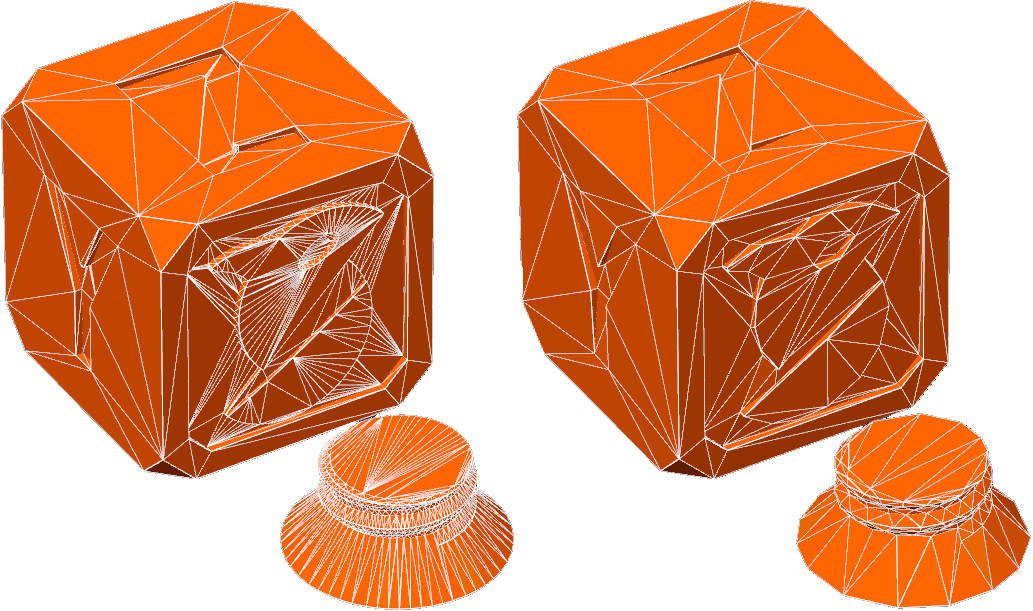
Simplify model
When working with models that have a high polygon count, the Simplify Model option can significantly reduce complexity and help decrease slicing times.
This function is especially useful for improving the performance of the slicer or achieving a specific faceted look for artistic or technical reasons.
To access the Simplify Model option, right-click on the object to simplify in the "Prepare" menu.

It is recommended to enable the "Show Wireframe" option when running a simplification process to visually inspect the outcome. However, be cautious: overly aggressive simplification may lead to noticeable detail loss, increased ringing, or other printing issues.
You can Simplify your model using the following options
- Detail Level: Control the level of detail in the simplified model by choosing from five preset options. This setting allows for a balance between mesh fidelity and performance.
- Decimate Ratio: Adjust the ratio between the original model's polygon count and that of the simplified model. For instance, a decimate ratio of 0.5 will yield a model with approximately half the original number of polygons.
Fix Model
The Fix Model option is designed to address common issues in 3D models, such as holes, non-manifold edges, and other mesh errors that can lead to slicing problems or print failures.
It's only available for Windows users as it relies on the Windows 3D Netfabb API for mesh repair.