Wall Generator
Mode: Advanced.
Variable: wall_generator.
The Wall Generator defines how the outer and inner walls (perimeters) of the model are printed.
Classic
The Classic wall generator is a simple and reliable method used in many slicers. It creates as many walls as possible (limited by Wall Loops) by extruding along the model’s perimeter using the defined Line Width. This method does not vary extrusion width and is ideal for fast, predictable slicing.

Arachne
The Arachne wall generator dynamically adjusts extrusion width to follow the shape of the model more closely. This allows better handling of thin features and smooth transitions between wall counts.
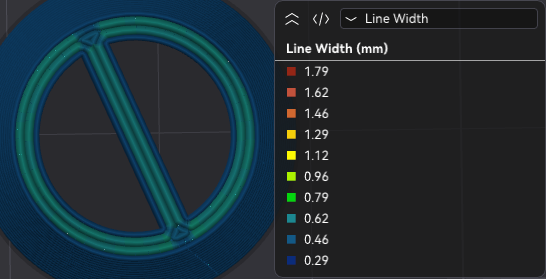
Wall transitioning threshhold angle
Mode: Advanced.
Variable: wall_transition_angle.
Defines the minimum angle (in degrees) required for the algorithm to create a transition between an even and odd number of walls. If a wedge shape exceeds this angle, no extra center wall will be added. Lowering this value reduces center walls but may cause under- or over-extrusion in sharp corners.
Wall transitioning filter margin
Mode: Advanced.
Variable: wall_transition_filter_deviation.
Prevents rapid switching between more or fewer walls by defining a tolerance range around the minimum wall width. The extrusion width will stay within the range:
Higher values reduce transitions, travel moves, and extrusion starts/stops, but may increase extrusion variability and introduce print quality issues. Expressed as a percentage of nozzle diameter.
Wall transitioning length
Mode: Advanced.
Variable: wall_transition_length.
Controls how far into the model the transition between wall counts extends. A lower value shortens or removes center walls, improving print time but potentially reducing coverage in tight areas.
Wall distribution count
Mode: Advanced.
Variable: wall_distribution_count.
Sets how many walls (counted inward from the outer wall) are allowed to vary in width. Lower values constrain variation to inner walls, keeping outer walls consistent for best surface quality.
Minimum wall width
Mode: Advanced.
Variable: min_bead_width.
Defines the narrowest wall that can be printed to represent thin features. If the feature is thinner than this value, the wall will match its width. Expressed as a percentage of nozzle diameter.
First layer minimum wall width
Mode: Advanced.
Variable: initial_layer_min_bead_width.
Specifies the minimum wall width for the first layer. It is recommended to match the nozzle diameter to improve adhesion and ensure stable base walls.
Minimum feature size
Mode: Advanced.
Variable: min_feature_size.
Minimum width required for a model feature to be printed. Features below this value are skipped; features above it are widened to match the Minimum Wall Width. Expressed as a percentage of nozzle diameter.
Minimum wall length
Mode: Advanced.
Variable: min_length_factor.
Avoids very short or isolated wall segments that add unnecessary time.
Increasing this value removes short unconnected walls, improving efficiency.
Note
Top and bottom surfaces are not affected by this setting to avoid visual artifacts. Use the One Wall Threshold (in Advanced settings) to adjust how aggressively OrcaSlicer considers a region a top surface. This option only appears when this setting exceeds 0.5, or if single-wall top surfaces are enabled.
Maximum wall resolution
Mode: Expert.
Variable: wall_maximum_resolution.
Controls the smallest wall segment length (in mm) that Arachne keeps during wall path simplification.
Lower values preserve more small segments and curved detail, which can improve surface quality, but increase G-code size and motion complexity.
Higher values simplify paths more aggressively, producing cleaner and smaller G-code at the cost of geometric fidelity.
Maximum wall deviation
Mode: Expert.
Variable: wall_maximum_deviation.
Defines the maximum allowed geometric error (in mm) when simplifying wall paths.
Increasing this value allows stronger simplification (smaller G-code and fewer tiny moves), but can reduce wall accuracy.
Decreasing this value keeps walls closer to the original geometry, but retains more segments.
If this setting conflicts with Maximum wall resolution, this deviation limit takes precedence.